
Studio management
Interior design project management software
Interior design project management software: follow one project from brief to warranty, with snags, site visit minutes, GST invoices and margin.
Picture a studio with five live projects. Each one has two or three WhatsApp groups. The carpenter’s slips sit in a notebook, the scope brief sits in someone’s email, and the invoices live in Tally. Everyone knows a piece of the project. Nobody holds the whole of it.
Interior design project management software brings a studio’s projects, site visits, snags, materials, contractor bills and GST invoicing into one place the whole team works from. This guide follows one project through a studio, from setup to the warranty snag a client reports after moving in. Each stage gives the good practice first, then how it works in DoYourDesign. The module numbers (A-101 to A-109) are the sheet numbers DoYourDesign uses for its nine modules.
1. Set up the studio and decide who sees what
Every studio has standing facts: its GST registration, financial year, letterhead and the names it gives to project stages. Write them down once. Then decide access by role: a junior designer needs drawings and tasks, not the contract value or the markup on the carpenter’s bill.
In DoYourDesign: an Owner or Admin sets the tax registration (Unregistered, GST Regular or GST Composition), the tax rates and the letterhead. Owners and Admins see every project and all money. Members see only the projects whose team they’re on, with no finance, contract values or material prices. Custom roles, such as an “Accounts” role, get exactly the access you choose. People who leave are deactivated, never deleted, and their tasks are handed over.
2. Create the project and its Locations (A-101)
A project starts when the work is agreed, not at the first enquiry. Give it a client, dates, a team and one accountable lead, and record each place the work happens.
In DoYourDesign: each project gets a reference code such as PRJ-0042, never reissued. Its contract value is visible only to Owners, Admins and roles granted it. A project can hold several Locations, each with an address, a state from the GST state list, a map pin and contacts such as the building manager. Statuses default to Design, Execution, Handover and Completed, and the studio can rename and add its own.
3. Write the brief as a structured sheet (A-108)
A good scope brief is the same document every time with different answers: room by room, then Vastu, budget and theme. Treat the agreed version as final until it’s deliberately reopened.
In DoYourDesign: the starter Residential scope & requirements template has a repeatable Bedroom section, so a 4BHK gets four, each with a label such as 13th floor right side. The client’s name and the Location’s address fill themselves. The project lead finalises the sheet, which freezes it, and reopening is recorded.
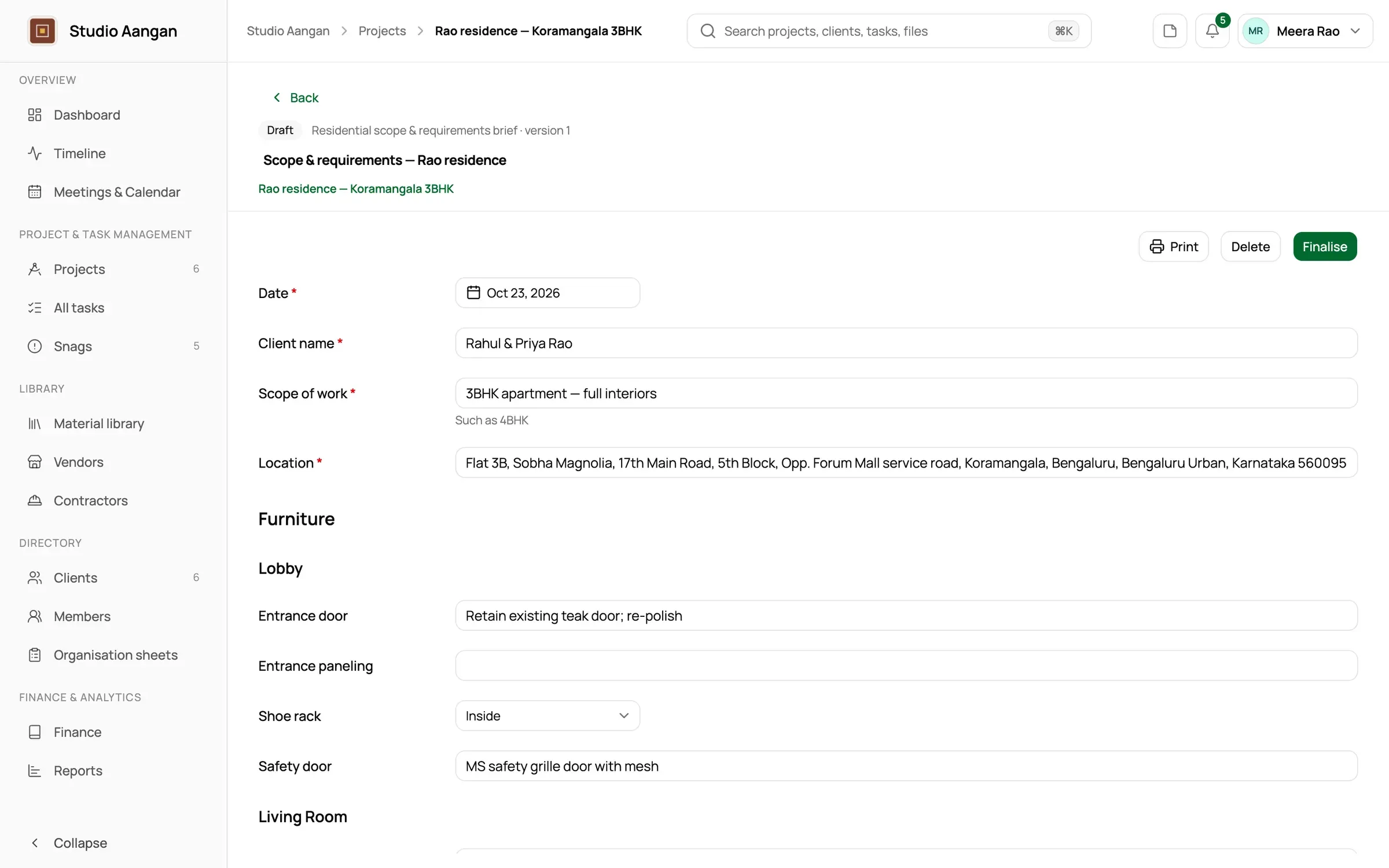
Sheet A-108: a scope brief in draft.
4. Plan milestones, tasks and dependencies (A-104)
Break the project into milestones such as Design freeze, Procurement complete and Installation. Give each task one owner and a due date, and note what waits on what: wardrobes can’t go in before the laminate arrives.
In DoYourDesign: milestone progress is read from completed tasks, never set by hand. With a dependency such as “Install wardrobes” waits on “Laminate delivered”, the waiting task can’t move to In Progress or Completed until the one it depends on is Completed, and its assignee is notified when it clears. A Blocked task always carries a reason. Each designer sees their own work across every project in My Tasks.
5. Specify materials at the day’s price (A-107)
Keep one library of what you specify, who sells it and for how much. When a material goes on a project, record the price it had that day.
In DoYourDesign: each material can have several vendor sources with a price before tax, and one marked preferred. A project material keeps the price its source had when specified, and later library changes are pointed out rather than applied. The library records what the studio specifies, not stock it holds.
6. Hold the site visit and send the minutes (A-103)
Site decisions get disputed when nobody wrote them down. Write minutes that separate decisions from actions, with a name and a date against each action, and send them the same day.
In DoYourDesign: a site visit is scheduled at a project Location, with team attendees and outsiders such as the client or the carpenter. Minutes can start from the Meeting minutes template, which fills in the date, Location and attendees and has decisions and actions tables. They’re emailed from the appointment, and the exact text each attendee received is kept.
Read next: Site visit minutes clients actually read.
7. Record contractor bills and margin (A-105)
Record money when it actually moves. Keep contractor bills apart from payments, and put your markup on the bill, never on the client’s paperwork. Then you always know margin to date: what the client has paid, less what the project has spent.
In DoYourDesign: the carpenter’s hand-written slip for ₹48,000 becomes a contractor bill with a photo of the slip attached. The studio adds markups, such as transport ₹2,000 and studio margin ₹6,000, for a client price of ₹56,000, and the markups never appear on a client document. Payments are allocated against the bill, in parts if needed. The project shows received, outstanding and margin to date, and office expenses never reduce it.
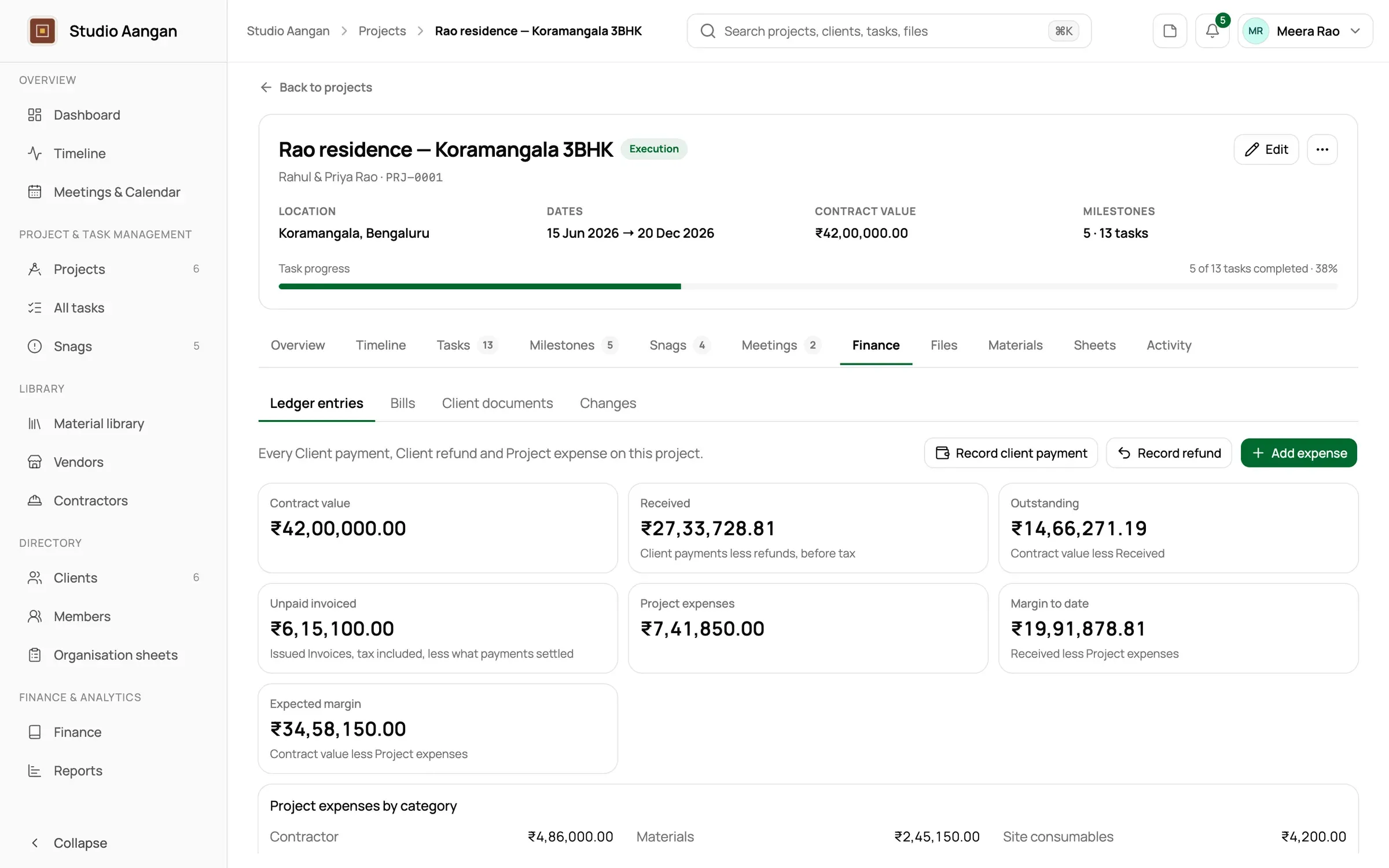
Sheet A-105: a project’s money at a glance.
8. Issue GST invoices by place of supply (A-106)
For work on a client’s property, the tax depends on where the work happens, not where the client lives. Number invoices in sequence each financial year, and correct an issued invoice with a credit note rather than editing it. This is general information, not tax advice, so check specific cases with your CA.
In DoYourDesign: place of supply is the project Location’s state: CGST + SGST in the studio’s own state, IGST elsewhere. Documents are numbered per financial year, such as INV/2026-27/014, and numbers are never reused. A GST Regular studio issues a Tax Invoice and a Composition studio a Bill of Supply, as a PDF on its letterhead.
Read next: CGST, SGST or IGST? Place of supply for interior design invoices.
9. Close every snag, and keep warranty apart (A-102)
Walk the space with the client before handover. Record where each defect is (master bedroom, wardrobe, right end), how serious it is, who will fix it and by when. “Fixed” is a claim: a snag is closed only when someone other than the fixer has checked it. Issues found after the client moves in go on a separate warranty list.
In DoYourDesign: each snag has a Location, a spot, a severity, an assignee, a due date and defect photos. The assignee adds fix photos and marks it Fixed, and someone other than whoever did the work marks it Verified. Won’t fix always carries a reason. Snags raised once the project reaches Handover or Completed are kept as Warranty, apart from the Inspection list.
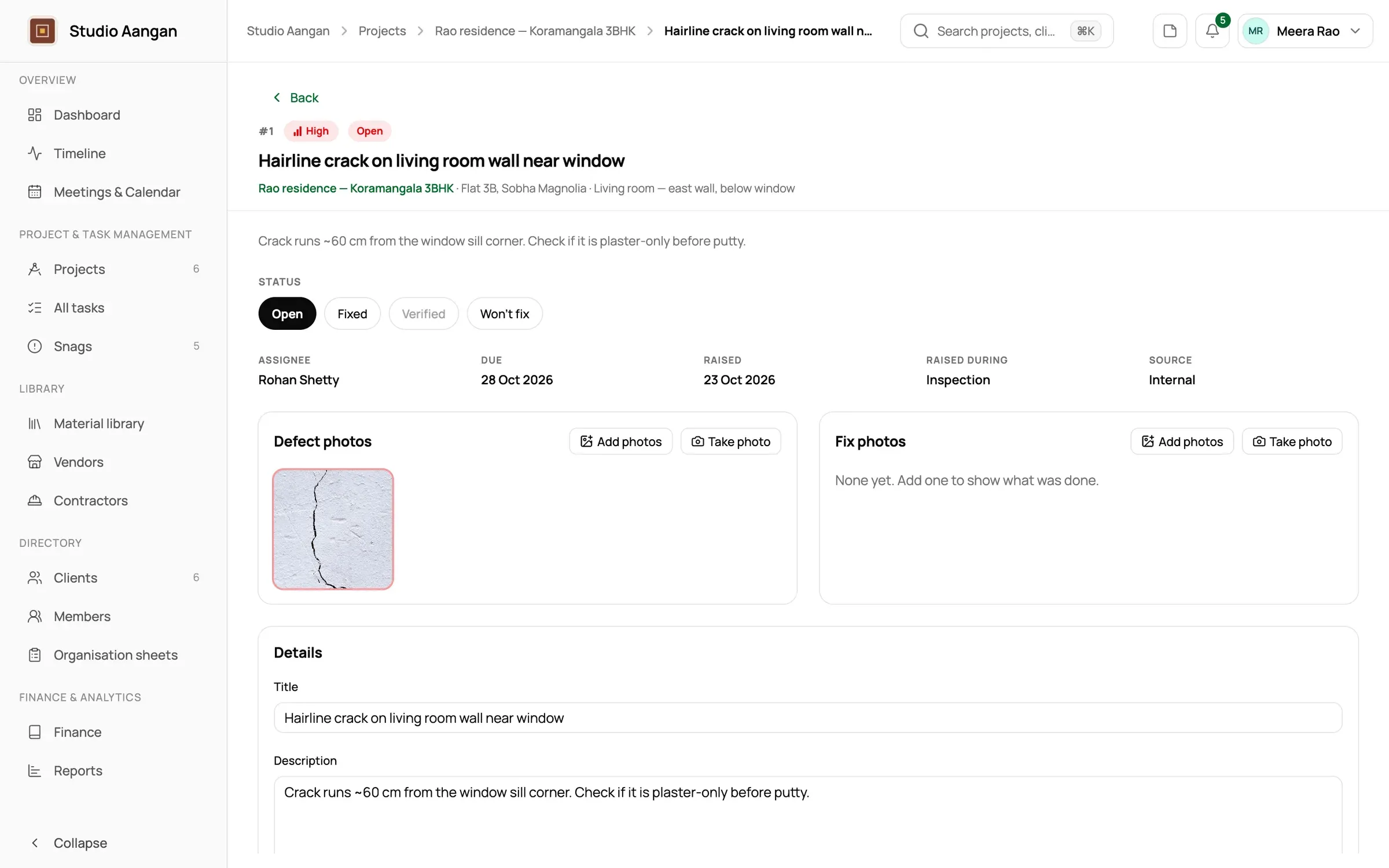
Sheet A-102: an open snag awaiting its fix.
Read next: A snag list that actually closes.
10. Archive, then review the month and the year (A-109)
When a project is done, take it out of the day-to-day view without losing anything. Once a month, look across every project: what’s overdue, what’s nearing handover, which invoices are unpaid.
In DoYourDesign: an archived project is hidden from day-to-day lists, keeps everything attached and can be unarchived at any time. The dashboard shows live projects, open snags, nearing handover and unpaid invoices, and four reports cover progress, milestones, finances and appointments. Nobody sees more than they could already open.
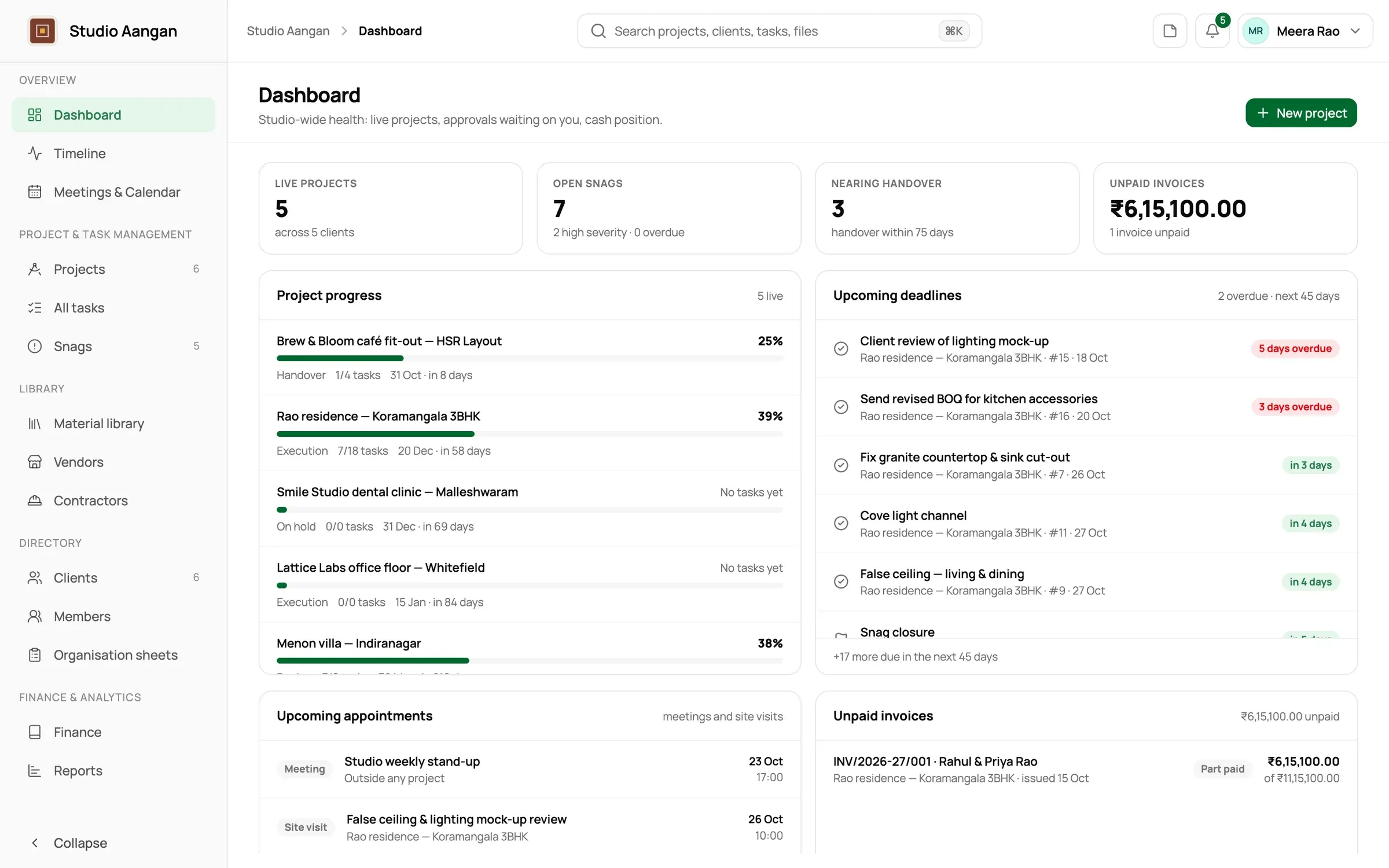
Sheet A-109: the studio dashboard.
What DoYourDesign doesn’t do
- No client portal. Clients, contractors and vendors don’t log in. Clients receive minutes, quotations and invoices on your letterhead.
- No native mobile apps. It runs in the browser on desktop, tablet and phone.
- Not a Tally replacement. No balance sheet or GST return filing.
- No CRM, stock, purchase orders, timesheets or design tools.
Frequently asked questions
What is interior design project management software?
It’s software that keeps an interior studio’s projects, site visits, snags, materials, contractor bills and client invoicing in one place the team works from. DoYourDesign is built for interior design studios, from a principal working alone to a few dozen people.
Does DoYourDesign replace Tally?
No. It’s the project side of the money: a cash-basis ledger per project, contractor bills and markup, margin to date, and GST client documents.
How much does it cost, and how do we start?
Every studio is a different size and works a different way, so we price DoYourDesign for yours. Tell us about your team and your projects and we’ll come back with a quote. Write to [email protected] or book a walkthrough.
In DoYourDesign, a project’s brief, plan, materials, site visits, contractor bills, invoices and snags all sit on one project page, under one reference code, seen by one team. The minutes go out from the visit, the carpenter’s markup stays private, and margin to date updates as the money moves.